Artemis Update (June)
This blog post was sent out to our waitlist members before publishing. Join the waitlist to get priority access for launch, and for exclusive updates before it goes public.
Artemis is being built for the players who already care about their pedals, their amps, their routing, and the way their rig feels. The goal is not to replace that. The goal is to give you rig-level control without turning your board into a mess of cables, compromise and tap dancing.
Real pedals when you want them. Virtual amps and effects when they are useful. Presets when you need repeatability. A touchscreen when editing on the floor gets annoying. MIDI when your rig needs to talk to everything else.
This is our chance to show you what we've been working on for the last few months and get you up to speed with the development of Artemis.
From Harry: hardware, audio and feel

I have now finished testing our second revision motherboard and enclosure.
The core analog routing system is working, and I’ve verified that Artemis can reorder the signal chain in every combination the hardware allows. This has been one of the hardest parts of the design because Artemis is not just turning loops on and off, it also can physically reroute your pedals so they can appear in different positions in the chain depending on the preset.
For example, you could have a fuzz before an overdrive in one preset, then move that same fuzz after a virtual amp or modulation effect in another. You can build simple serial chains, split into wet/dry style setups, mix real pedals with internal effects, or keep things more traditional and use Artemis like a very powerful loop switcher.
In summary, the analog side of the product is now in a really strong place, which is mainly thanks to our relay based switching approach that makes Artemis super transparent.
Virtual loop audio quality
One area I have decided to improve further is the audio path for the virtual loops. After testing, and after feedback from the community, I’ve decided to upgrade the codec and clocking architecture inside Artemis. In plain English, this is the part of the product that handles the conversion between your real analog guitar signal and the internal digital effects engine.
This matters because the virtual loop should not feel like the weak point in the rig. If you are placing a virtual amp, delay, EQ, compressor or modulation effect between real pedals, the noise floor and conversion quality need to hold up. The new codec chip has some ridiculous factory figures quoted which even outperform my focusrite scarlett. I can’t wait to get the next set of boards produced to test the new virtual loops, we will keep you all posted on our instagram with the latest sound demos as they roll in!
Input buffers
I have also had some feedback from the community around input buffers. To maintain the best compatibility, especially with vintage fuzzes, I am now adding the option to bypass the input buffers on Artemis in our next motherboard revision.
It’s not the most exciting new feature, but it is probably one of the most important changes we could make before launch as many of you are vintage pedal fans.

Latency and feel
A lot of people have also asked about latency when using the virtual loops, which is completely fair.
Current testing is showing low single-digit milliseconds (2-3ms) of latency, depending on the configuration being tested. If you are just using the analog loop-switching portion, the latency is 0, so there is no penalty for combining extra real pedals with the virtual loops. Latency figures aside, in practice, Artemis feels immediate under the fingers, and this has been one of the biggest priorities from the start.
The whole point of Artemis is that you should be able to put virtual effects into a real pedalboard and still have it feel like part of your rig. Going forward, I'm exploring moving to a more optimised audio stack to make sure Artemis has the lowest latency possible, whilst still remaining jitter-free.
Enclosure and thermals
The enclosure has had a lot of attention too, you all seem to be loving the latest design!
I’ve moved towards a more premium bead-blasted anodised aluminium finish, paired with the walnut side panels that many of you have already seen in the renders and prototype photos.
Internally, I have also improved the thermal design. Artemis uses a fairly powerful quad-core 2.4 GHz processor, because running a touchscreen interface, routing logic, virtual effects and amp models at low latency is not trivial.
I have been testing the thermal performance under heavy load to make sure the unit can run virtual amps and effects for long sessions without the processor getting into trouble. The enclosure is not just there to look nice. It is also doing useful work as part of the heat-spreading system.
Aside from these improvements, the hardware is in a really solid place.
From Nathan: Houston software
The Artemis software is called Houston, and this is where a lot of the product is starting to come together.
The main focus recently has been making the interface feel fast, simple and reliable. Editing a preset should feel more like arranging a pedalboard than programming a rack unit.
Recently, we have been working on faster touchscreen response, drag and drop preset editing, footswitch navigation, MIDI control, preset routing improvements, and better integration between real loops and internal effects.
Our open source commitment
We firmly believe that open source software is the way to go with the Artemis - here is how we are going to approach this:
During development, the software will be closed so that we maintain our intellectual property before launch
Once Houston reaches 1.0 on the main branch, the source code for this will be made publicly available for free as a GitHub repository
This will allow people to tweak bits of code based on their needs, as well as run the code on other devices. It will also allow us to track the wants and needs of our users for future features.
The main focus recently has been making the interface feel fast, simple and reliable. Editing a preset should feel more like arranging a pedalboard than programming a rack unit.
Recently, we have been working on faster touchscreen response, drag and drop preset editing, footswitch navigation, MIDI control, preset routing improvements, and better integration between real loops and internal effects.
MIDI Integration
MIDI Send and Receive functionality are now working within Houston, albeit with UI that is still work in progress.

To test this, I’ve been using the Send portion to control another Artemis. For instance, the screenshot below shows MIDI send commands to swap to the first song made on the other Artemis, and then swap to Preset 3:
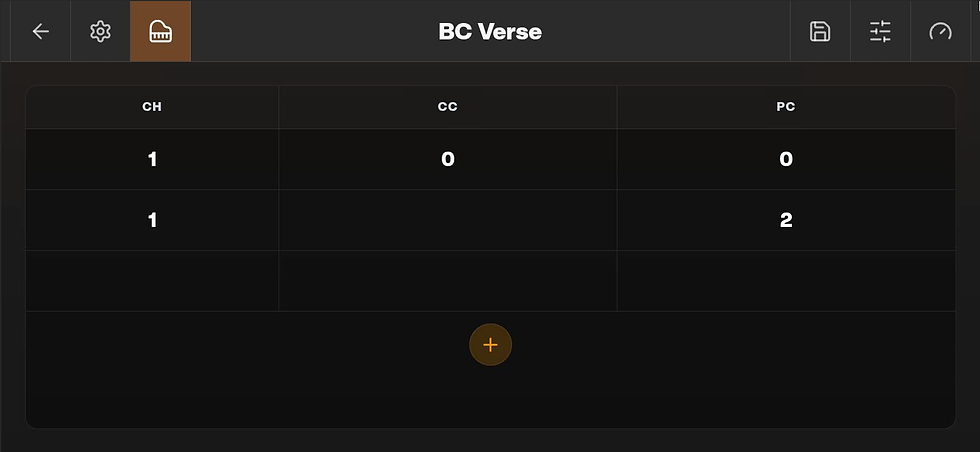
On the Receive side, we aimed to address a common problem - complicated MIDI configuration on competing devices. With Artemis, everything that the MIDI in port can do will appear in a scrollable table in the MIDI Receive section:

Footswitches - all the options
We puzzled over how to integrate the footswitches for the Artemis for some time - going through several iterations before arriving at what we feel gives the most user freedom. Footswitches can have the following behaviours - configurable globally from their pane in the main carousel (the UI for which is still very much a work in progress, with LED support not finalised yet:
Trigger on Press (DEFAULT - Leads to on hold function side effects)
Trigger on Release (LEGACY - Plays nicer with hold functionality)

These modes can be toggled between using the ‘Trigger’ button, with Houston remembering your preference between sessions.
As previously mentioned, the default trigger mode of activating on press has certain ‘side effects’ - by that I mean that holding a footswitch while in this mode will first swap presets, and then do the hold function. To mitigate this, we’ve implemented invert mode - which allows the jam page to present the additional functions as its own menu. Simply tap the footswitch corresponding to the currently selected preset, and the invert functionality will become the norm until you exit (also togglable from within this pane).
All of the default mappings for the five footswitches can be changed - with the invert and hold functionalities being handled separately for even more options!

NAM A2 and internal effects
We are also working on support for NAM A2 as part of the internal effects engine. The plan is for Artemis to support modern neural amp modelling as part of the launch firmware, so you can place captured amps and effects directly inside your signal chain, in and amongst your physical pedals.
That does not mean every player has to use amp modelling. If you love your real amp, you can keep using it. If you want Artemis mainly as a loop switcher and MIDI controller, that is completely valid. But if you want to run a compact rig, record silently, use amp captures live, or place a virtual amp between real pedals, that is exactly the sort of use case we are building for.
From Joel: community, demos and launch plans
One of the most useful things about the waitlist so far has been the questions. A few have come up again and again, so I wanted to answer them properly here.
Can Artemis replace a traditional loop switcher?
Yes. At its simplest, Artemis can be used to bring pedals in and out of your signal chain using presets and footswitches.
Can it reorder pedals?
Yes. This is one of the main things that makes Artemis different. Your pedals are not locked into one fixed order.
Can I still use my Vintage pedals?
Yes. Artemis is designed around being able to use vintage pedals. We have added Input buffer bypasses to make sure your loops are Fuzz friendly.
Can I put virtual effects between real pedals?
Yes. This is one of the key ideas behind Artemis. You can combine analog pedals and internal effects in the same preset.
Can it do wet/dry or parallel routing?
Yes. Artemis includes internal mixing and routing features designed for more flexible signal paths, including wet/dry style setups.
Does it support MIDI?
Yes. MIDI is being built into Houston so Artemis can control and respond to other gear in a larger setup.
Is it only for complicated rigs?
No. You can use Artemis in a very simple way if you want. The deeper routing is there when you need it, but the aim is to keep the day-to-day experience straightforward.
Demos
In case you missed them, we have also been sharing early demos of the routing engine, virtual effects and MIDI control.
You can watch them here: These are still prototype demos, so they are not polished launch videos yet. But they show the core idea working: real pedals, virtual effects, touchscreen editing and flexible routing all living inside one unit.
Timeline and pricing
We are still aiming for our planned October launch. Our initial alpha testing batch will be ready for mid August so we will be in touch shortly to discuss next steps!
The first production run will be a limited founders edition batch, with priority access going to the waitlist first. Artemis will retail for £589 GBP including VAT.
There is still a lot to do between now and launch, but the product is moving further each day. The next stage is about refinement: final audio validation, final hardware spin, production preparation, software polish, and more proper demos.
If there is something you want to see in the next update, or a use case you want us to test, please send us a message or email and we are always happy to have a chat.
Harry, Joel and Nathan
Trinity Labs

Comments